
Agents in Business Central: automate orders and invoices with AI
Business Central agents automate orders and invoices with reliable, governed, ERP-native AI
What are Agents in Business Central
Business Central agents are autonomous yet governed AI components that execute end-to-end operational processes within Business Central. Instead of just making suggestions, they take action: they capture orders from email, convert vendor invoices into accounting drafts, and leave them ready for approval. They are natively activated and configured in the ERP and operate under permissions and profiles defined by IT.
Unlike other automations, these Business Central agents are not fragile integrations glued onto the outside: they live inside the ERP itself. In addition to pre-built agents, Microsoft enables the connection of external agents to the ERP through Model Context Protocol (MCP), a standard that facilitates secure integrations with platforms like Azure OpenAI or Copilot Studio.
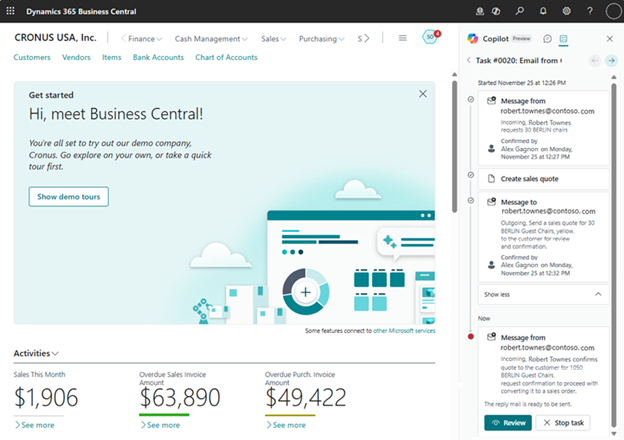
Sales order agent
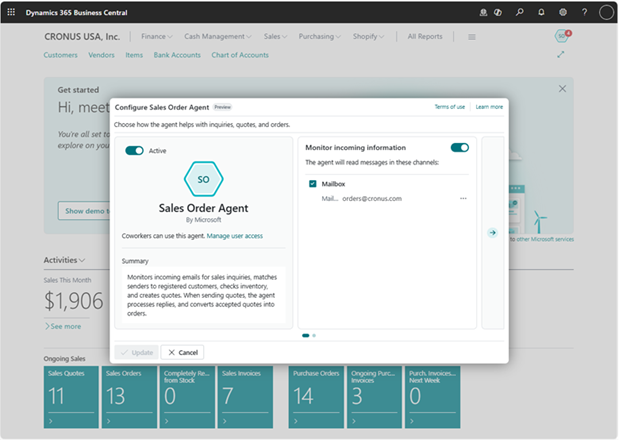
This is one of the most useful Business Central agents for sales teams: it monitors an inbox, understands customer requests, checks availability, generates quotes in PDF, and converts them into orders upon confirmation, without losing human control at any step. It is activated from Copilot & agent capabilities and configured in minutes, assigning authorized users and the mailbox to monitor.
Accounts Payable Specialist
On the purchasing side, this agent reads PDF invoices arriving by email, extracts the data with Azure Document Intelligence, identifies the vendor, proposes the accounting classification, and creates invoice drafts for review. Available in selected country versions, with activation and permissions managed from the Admin Center.
Why implement Business Central Agents now
The agents have gone from “promise” to native capabilities in Business Central: Sales Order Agent y Payables Agent they are documented in detail by Microsoft, including configuration, flow, language limitations, and availability.
Additionally, the MCP server official facilitates a standard and governed pathway to expand system-to-system automation.
Benefits of Business Central Agents
More speed and volume
Less manual tracking: the agent manages the complete lifecycle from email receipt to approval, processing more operations in the same amount of time.
Quality and consistency
Apply your accounting and pricing rules consistently, always with human review and an audit trail, reducing errors and discrepancies.
Security and control
It works with defined permissions and profiles, and no agent executes irreversible actions without your approval, so the automation never gets away from you.
Native deployment
It is activated within the product itself, without fragile integrations, and you can expand it with MCP whenever you need to, protecting your investment for the future.
Frequently Asked Questions about Agents in Business Central
Copilot is interactive user assistance; agents execute autonomous processes under permissions and with human review. In Business Central, this is embodied in agents such as the Sales Order Agent and Payables Agent documented by Microsoft.
No. Agents create drafts and require review/confirmation before publishing or sending communications, depending on configuration.
Have a Microsoft 365 mailbox (user or shared) to monitor emails; delegate Read and manage / Send as permissions to the users who will activate/configure them; enable the capability in Copilot & agent capabilities.
Yes. Microsoft documents the connection of AI agents to the ERP via MCP, an open standard for context and tools.